Kuroosu Launcher
Press PLAY and your osu! starts right on Kuroosu – no shortcuts, no -devserver. Your profile, rankings, news and your Discord status, all in one app.
Free · installs in seconds, no admin rights needed · updates itself
 Kuroosu lazer client
Our own osu!lazer for Kuroosu – no lazer delay, no notelock, same account and leaderboards as osu!stable. Download it on its own if you don't want the launcher.
Windows 10 & 11 · log in with your Kuroosu account · updates itself
Linux: 64-bit AppImage, no install needed.
Launcher or this download?
Both give you the same client. The launcher can also start osu!stable and shows your profile; this download is only the lazer client.
Portable or installer?
The installer puts it into your apps and keeps it up to date. The portable .zip runs from any folder – unpack it and start Kuroosu.exe.
How do I start it on Linux?
Make the .AppImage file executable in its properties (or run chmod +x on it), then open it. It updates itself, just like on Windows.
 Kuroosu Overlay
A free overlay for osu!stable – for everyone: your pp with how much you can still get in this play, the pp of the map you selected, your real tapping speed in BPM next to the song's, how fast you click (keys per second) and how long you hold every key – each press runs through its lane as a bar. Always on screen, with its own settings: any size from tiny to huge, drag it anywhere, your own colours, and extras like accuracy, combo, misses, unstable rate, stars and map progress – turn the box off to keep only the numbers, or show just your pp or just your keys.
Runs next to the clock · always on screen · updates itself
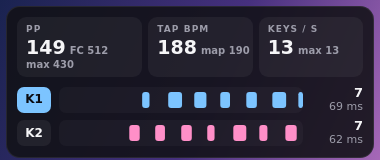
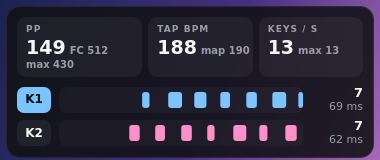
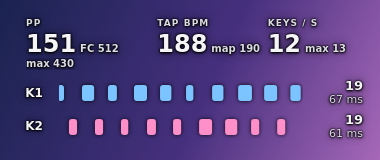
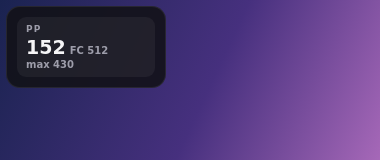
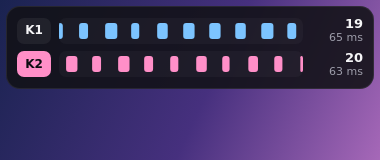
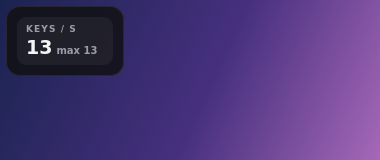
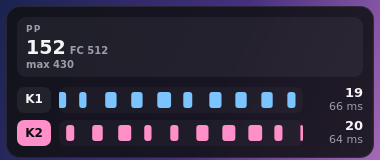
How do I see it in game?
Play osu! in Borderless or Windowed mode (osu!stable: Options → Graphics → Fullscreen off, Borderless on). Windows does not draw anything over exclusive fullscreen. Click the icon next to the clock to open the settings: position, size, colours, look and what it shows.
Streaming with OBS?
Click the icon next to the clock → Copy link for OBS (it keeps your settings). In OBS: Sources → + → Browser, paste the link, width 380, height 160 (330 with extra numbers). That works in fullscreen too.
Does it work with lazer?
No, the overlay is made for osu!stable. With lazer it stays hidden – our Kuroosu lazer client has its own key counter in the game.
Does it change osu!? Is it allowed?
It changes nothing in osu! and is allowed on Kuroosu. The overlay only reads what osu! shows (like the overlays many streamers use) – on its first start it downloads a small free helper (about 50 MB) and runs it in the background. Nothing is sent to us.
"Windows protected your PC"?
Windows shows this for new programs from small projects like ours (we don't pay for a code-signing certificate yet). It's safe to continue:
- 1Click More info
- 2Click Run anyway
- 3The launcher installs and opens – log in and press PLAY
Questions
Does it change osu!?
No. It starts your normal osu! with -devserver kuroosu.online, the official way to play on another server. Nothing in osu! is patched or changed, and you can still play on other servers.
Do I need a new account?
Use your Kuroosu account – the same one for the website and in osu!. Create one here if you don't have it yet.
How do I close it completely?
Right-click the Kuroosu icon in the tray (next to the clock) and choose Quit. In the launcher settings you can also make the close button quit it.
How do I remove it?
Windows Settings → Apps → Kuroosu Launcher → Uninstall. Your osu! stays as it is.